-
Bug
-
Resolution: Unresolved
-
 P2: Important
-
None
-
5.9.6
-
None
-
Windows 10
VS 2017
-
Android,
Windows
The code:
ApplicationWindow {
    id: appWin
    width: 640
    height: 480
    visible: true

    toolBar: ToolBar {
        id: tb
        style: ToolBarStyle {
            padding { left: 4; right: 4; top: 2; bottom: 1 }
        }
        Flickable {
            width: tbRow.width
            height: tbRow.height
            contentWidth: tbRow.implicitWidth
            contentHeight: tbRow.implicitHeight
            clip: true
            RowLayout {
                id: tbRow
                width: appWin.width-8
                spacing: 8
                ToolButton { width: 48; height: 48; text: "A"
                             onClicked: lastBtn.visible = !lastBtn.visible}
                ToolButton { width: 48; height: 48; text: "B" }
                ToolButton { width: 48; height: 48; text: "C" }
                ToolButton { width: 48; height: 48; text: "D" }
                ToolButton { width: 48; height: 48; text: "E" }
                ToolButton { width: 48; height: 48; text: "F" }
                ToolButton { width: 48; height: 48; text: "G" }
                Item { Layout.fillWidth: true}
                ToolButton { width: 48; height: 48; text: "Close"; id: lastBtn }
            }
        }
    }
}
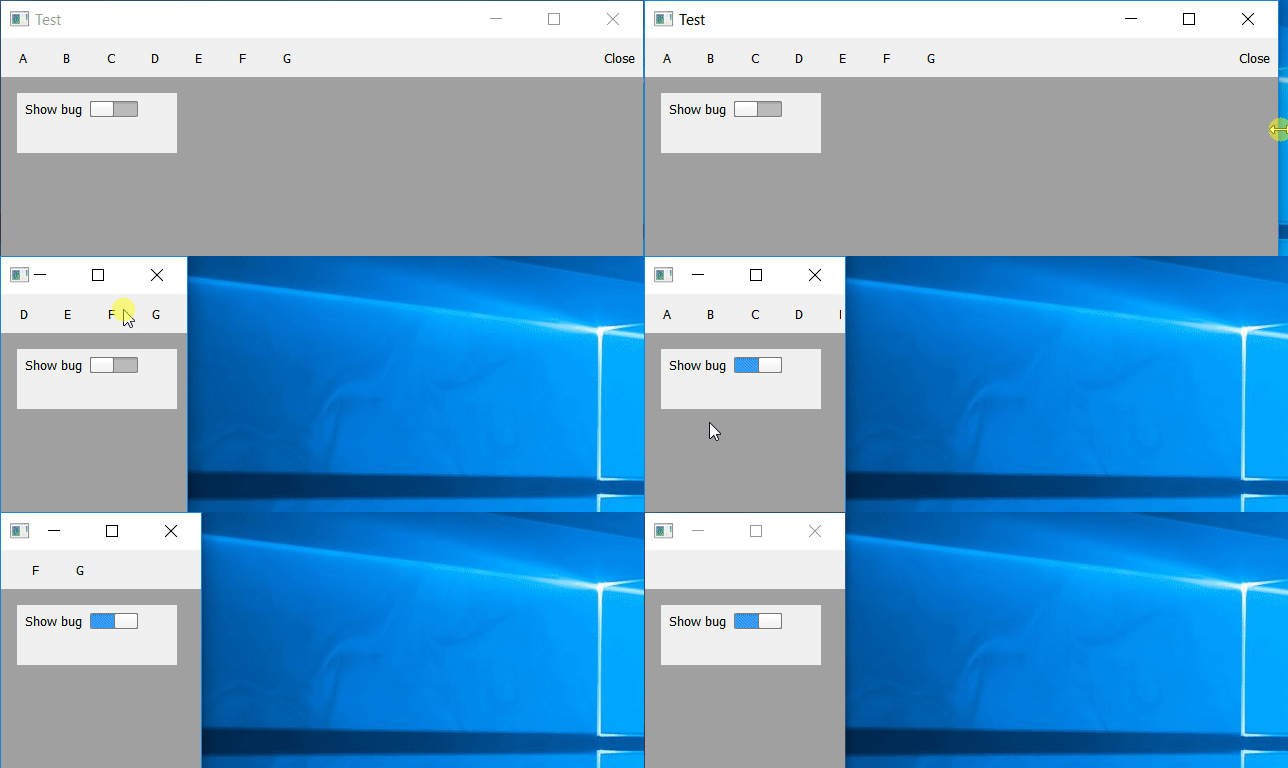
When the lastBtn is hidden in runtime (by clicking on the first ToolButton) then the width of tbRow is not adjusted, so the whole toolbar can be swiped left (when the window width is decreased).
But if the lastBtn is hidden in Qm id: lastBtn; visible: false then the width of tbRow is correct.